
Often there is confusion regarding the output of MTR so here is a brief explanation.
MTR stands for “My Trace Route” and combines traceroute and icmp to determine if there is any packet loss to a given destination.
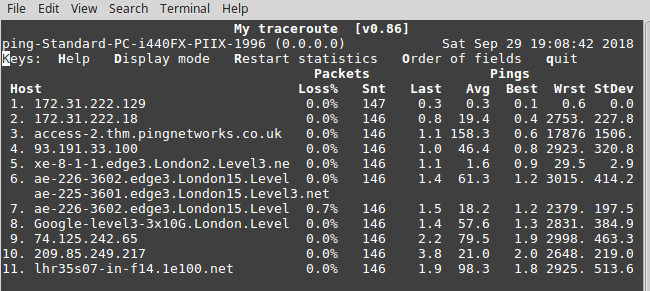
For example an MTR from my desktop to Google gives the following output:
MTR (like traceroute) determines the first hop by sending a packet to the destination with a time-to-live (TTL) set to 1. The first hop provides a message to tell the sender the TTL has expired and in the process sends its IP. The source now knows the IP of the first hop. A second packet is then sent with the TTL set to 2. Consequently the second hop IP is learnt. This process is repeated until the destination is reached – giving a hop-by-hop path to the destination.
This whole process is continually repeated in order to determine if any of the hops are dropping packets.
The key thing to remember here is that in order for a packet to reach the last hop it must traverse all the other hops. If it reaches the last hop with zero packet loss then it must have traversed all the other hops without a problem.
The thing that catches a lot of people out is they will see packet loss on one of the hops and believe this is an end-to-end problem. However if the last hop shows no packet loss then all traffic sent to the last hop is getting there. What is happening is a router in the path may chose to drop a packet destined to itself in favour of routing traffic to the destination. This is because the routers’ primary purpose is to route traffic to the destination and not reply to icmp packets (which may be hitting a threshold and consequently rate limited).
In the above MTR you can see hop 7 has 0.7% packet loss, but this does not follow through to the destination and therefore only impacts that particular hop. Hop 7 is not the final destination, so it doesn’t matter.
The following link may help with a more nuts and bolts explanation of traceroute, and therefore MTR
https://ccieblog.co.uk/basic-troubleshooting-commands/how-does-traceroute-work

 The Traceroute Blog